Build habits you can see.
Goal4 tracks daily, weekly and monthly habits with a one-tap counter, streaks, and GitHub-style grids that fill in as you show up. No account, and your habits stay on your phone.
Name it. Tap it.
Watch it fill in.
A habit in Goal4 is a name, a frequency and a number to hit. Logging it takes one tap, and the app keeps the score.
Name it, set the goal
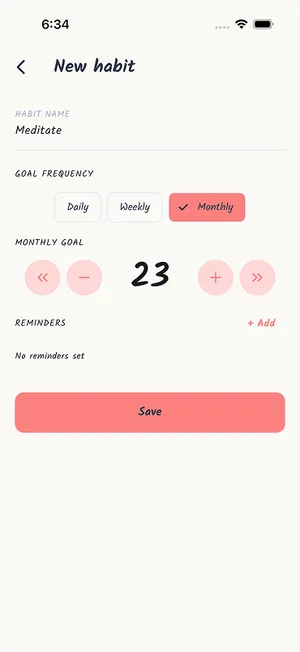
Give the habit a name, choose daily, weekly or monthly, and set the number that counts as done: once a day, 3 workouts a week, 20 runs a month.
Tap to log it
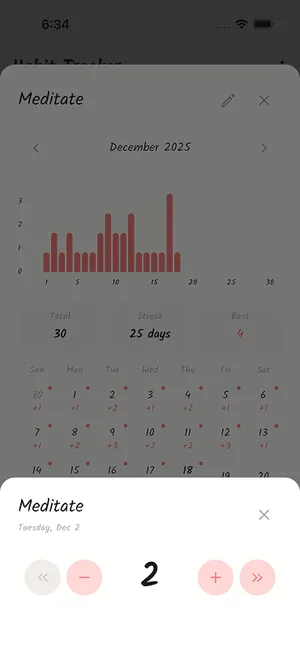
Each tap on the habit card adds one toward this period's goal. Tapped one too many? Take it back with minus, or open any past day and fix the count.
Watch the grid fill in
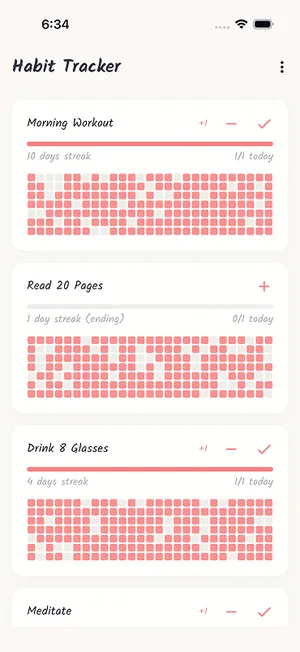
Every day you log shades a square on the habit's grid, darker the closer you got to the goal. The streak adds one for each complete day, week or month in a row.
Why a grid, not just a streak.
Every habit runs on a loop: a cue sets off a routine, and a reward makes you want to repeat it. Tracking works by making the routine visible. Marking a habit done is a small reward on its own, and a streak that keeps growing gives you a reason to show up again tomorrow. That is the idea behind "don't break the chain": do the thing every day, mark it on a calendar, and the longer the chain gets, the less you want to break it.
A streak only knows one number, though. Miss a single day and it drops to zero, even if you showed up 26 days out of 30, and that reset is often the moment people give up. A contribution grid keeps the whole record. One missed day is one light square among dark ones, and you can tell a habit that is slipping from one that just had a bad week. Goal4 puts both on every habit card: the streak to protect and the grid that shows how consistent you have really been.
Built for the long run.
Everything below is in the free version, for up to 3 habits. Pro lifts the habit and reminder limits and opens all 16 themes.
See a month in one look
Every habit card carries a GitHub-style contribution grid, so gaps and good runs are obvious without opening anything. Switch between five grid views, from the classic 7-row grid to weekly and monthly calendar layouts.
Streaks that warn you first
Your streak counts complete days, weeks or months in a row. If today isn't done yet but yesterday was, it shows as ending instead of dropping to zero, so you know it's at risk while there's still time to log.
Goals that fit the habit
Not everything is daily. Set 8 glasses a day, 3 gym sessions a week (Sunday to Saturday) or 20 runs a month. The progress bar and the "3/5 today" count track each habit against its own goal.
Reminders on your schedule
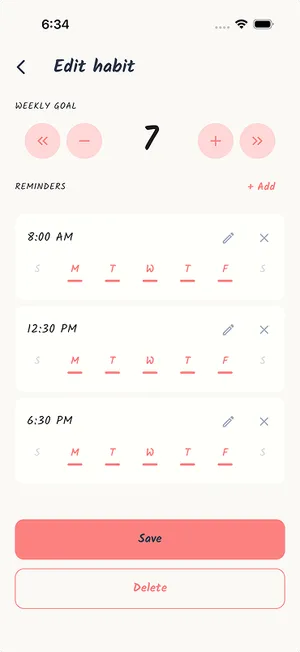
Set reminder times for each habit and pick quiet days to skip, so a weekday habit doesn't ping you on Saturday. Free habits get up to 2 reminders each; Pro removes the limit.
A calendar for every habit
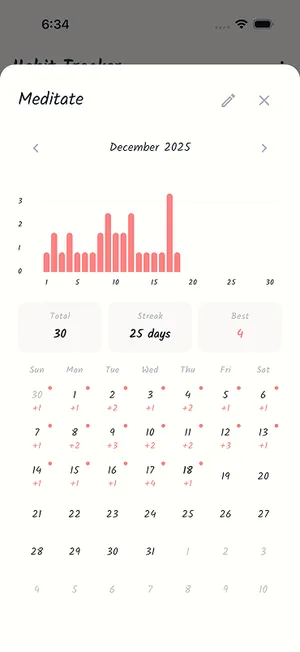
Tap a habit to see its month: a daily bar chart, the count for each day, your total, your streak or completion rate, and your best day. Tap any date to correct what you logged.
On your home screen, and shareable
Add the home screen widget on iPhone or Android to check progress and streaks without opening the app. Share any habit as an image card with its grid and streak through your phone's share sheet.
More apps for the
way you actually live.
Goal4 is part of a small lineup of single-purpose apps from EHM Tech. No accounts, and your data stays on your phone.
30 Day Challenge
Commit to one habit for 30 days and log it once a day, with streaks and a photo timelapse of the month. A good way to get a new habit off the ground.
Reset75
A 75-day challenge with a fixed list of daily tasks, progress photos and strict or forgiving rules, for when you want to change more than one habit at once.
Alcohol Free Tracker
If drinking is the habit you're breaking, Sober44 counts your alcohol-free time to the second and adds up the money and drinks you didn't spend.
Budget Tracker
Make checking your spending a habit too. Log expenses, set monthly budgets and save toward a goal, all on your phone.
Frequently Asked Questions
Is Goal4 free?
Yes. Goal4 is free to download, and the free version tracks up to 3 habits with up to 2 reminders each. It includes daily, weekly and monthly goals, contribution grids and streaks, all 5 grid views, the calendar history, home screen widgets, share cards and 3 themes. Pro removes the habit and reminder limits, unlocks all 16 themes and hides the card promoting our other apps that free users see below their habits. Pro is a weekly or yearly subscription with a 3-day free trial, and the price for your country is shown in the app before you confirm.
Do I need an account, and where is my data stored?
No account and no sign-up. Your habits, daily counts, reminders and settings are stored on your phone and are never sent to our servers. The app sends anonymous usage and crash reports and checks a Pro subscription with the App Store or Google Play, but none of that includes your habits. Because nothing is uploaded, there is no cloud copy: uninstalling the app deletes your habit history with it.
Does Goal4 work offline?
Yes. Logging, streaks, grids, the calendar and the widget all run on your phone without a connection, and reminders are scheduled on the device itself. Goal4 only goes online to send anonymous analytics and crash reports and to verify a Pro subscription.
Can I track habits that aren't daily?
Yes. Each habit has its own frequency and goal. Daily habits reset every calendar day, weekly habits run Sunday to Saturday, and monthly habits run for the calendar month. Set the number that counts as done, such as 8 glasses a day, 3 gym sessions a week or 20 runs a month. Each tap adds one toward that number, and the streak counts complete days, weeks or months in a row.
How do streaks work, and what does "ending" mean?
A streak is the number of periods in a row where you hit your goal. If today isn't complete yet but yesterday was, Goal4 still shows your streak and marks it as ending, which means it breaks unless you log today. Weekly and monthly habits work the same way with weeks and months. A missed day resets the streak, but the contribution grid keeps every day's count, so one miss shows up as a single light square rather than wiping out your history.
Can I fix a day I forgot to log?
Yes. Tap the habit to open its calendar, tap the day you missed, and raise or lower that day's count. The grid, the streak and the monthly totals update to match. You can also change a habit's name, goal, frequency and reminders at any time.
Start with one habit.
Free on the App Store and Google Play. Name a habit, set a goal, and tap once to log today.
The shape of the app.
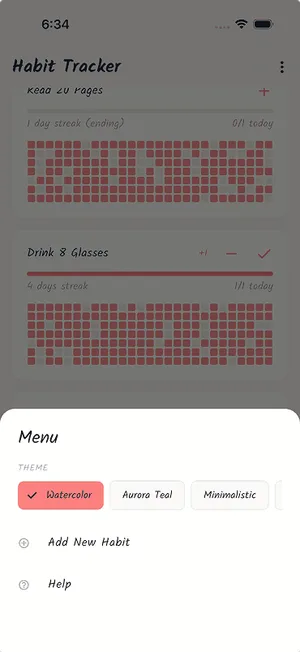
Six screens from the app: the habit list, a habit's calendar, the day counter, themes, a new habit and its reminders.